01
Upload a pose photo of yourself
Start with one clear full-body photo. This is the pose and scene your generated look keeps.
How It Works
Upload a photo of yourself, add the pieces you want to try, and generate a look that still feels like you. The goal is simple: help you decide what to wear or buy with more confidence.
Start with one clear full-body photo. This is the pose and scene your generated look keeps.
Upload garment photos from your closet or items you are considering so you can mix and match.
Pick your pose, choose your pieces, and generate. In most cases, your result is ready in under a minute.
Select pose Select garments Generate look
What to expect
This is a real before-and-after from Lookstudio. The pose and background stay consistent while the outfit changes.
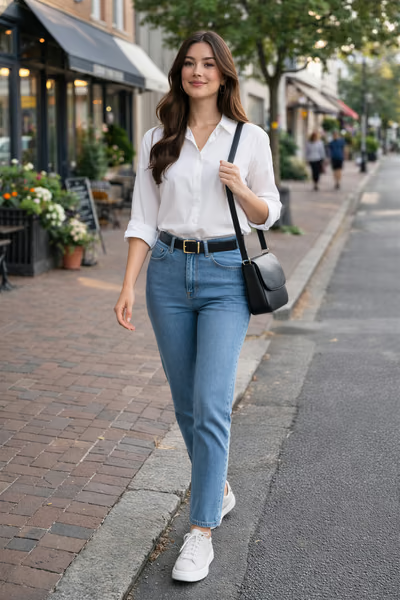
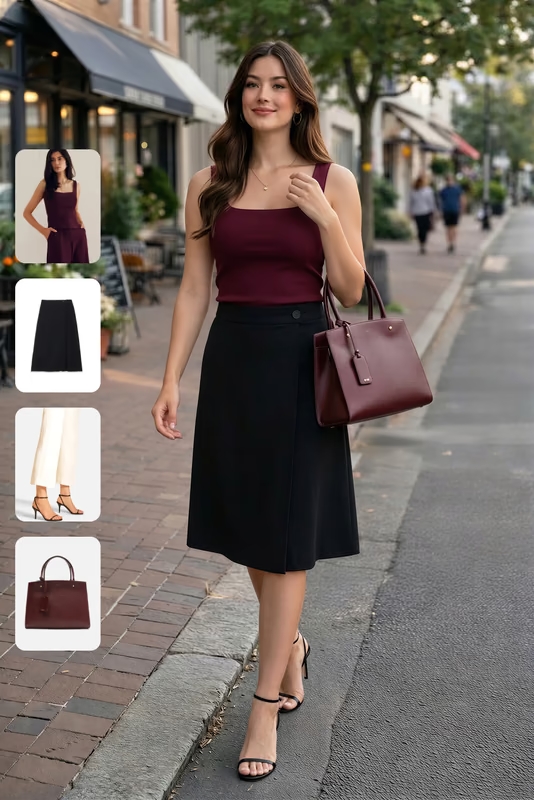
Same pose, same background, same you. The outfit is what changes.
One full-body pose photo in clear lighting.
At least one garment photo (flat-lay, hanger, or product photo).
A style question you want to answer, like what to wear for an event or whether a new piece works with your closet.
Need photo guidance? What photos work best.
Using this for shopping decisions? Virtual try-on clothes | Outfit builder app | Outfit planning app
FAQ
Start with 10 free credits and try the workflow with your own pose and your own pieces.
Create my first lookNo credit card required • 10 free credits included